Workflow 3 - cluster the trajectory
Input: EnGen object featurized with reduced dimensionality (generated by Workflow2)
Output: Representative trajectory ensemble
Steps:
Import the featurized trajectory from Workflow2
Choose clustering technique: KMeans, Gaussian Mixture Models
Choose appropriate parameters for clustering (number of clusters)
Additionally filter trajectories
Extract the ensemble
[1]:
#required imports

from engens.core.EnGens import EnGen
from engens.core.ClustEn import *
import pickle as pk
Warning: importing 'simtk.openmm' is deprecated. Import 'openmm' instead.
Step 0 - Load data from Workflow2
[2]:
engen = None
with open("wf2_resulting_EnGen.pickle", "rb") as file:
    engen = pk.load(file)
[3]:
traj = engen.traj
ref = engen.ref
print("Using the trajectory {} and reference pdb file {}".format(traj, ref))

topology = engen.mdtrajref
print("The topology is:")
print(topology)

feat_dims = engen.dimred_data.shape[0]
print("The dimensionality of your featurization is {}".format(feat_dims))

feat = engen.featurizers[engen.chosen_feat_index]
print("You chose to featurize with")
print(feat.describe())

dimred_data = engen.dimred_data
print("After dimensionality reduction the dimension of your features is {}".format(dimred_data.shape[1]))
Using the trajectory pentapeptide-00-500ns-impl-solv.xtc and reference pdb file pentapeptide-impl-solv.pdb
The topology is:
<mdtraj.Topology with 1 chains, 5 residues, 94 atoms, 95 bonds>
The dimensionality of your featurization is 5001
You chose to featurize with
['COS(PHI 0 LEU 2)', 'SIN(PHI 0 LEU 2)', 'COS(PSI 0 TRP 1)', 'SIN(PSI 0 TRP 1)', 'COS(PHI 0 ALA 3)', 'SIN(PHI 0 ALA 3)', 'COS(PSI 0 LEU 2)', 'SIN(PSI 0 LEU 2)', 'COS(PHI 0 LEU 4)', 'SIN(PHI 0 LEU 4)', 'COS(PSI 0 ALA 3)', 'SIN(PSI 0 ALA 3)', 'COS(PHI 0 LEU 5)', 'SIN(PHI 0 LEU 5)', 'COS(PSI 0 LEU 4)', 'SIN(PSI 0 LEU 4)']
After dimensionality reduction the dimension of your features is 7
Step 1 - choose the clustering method
[4]:
#------------two clustering algorithms------------------#
#----------------choose and uncomment one----------------#
# Option 1 - choose Kmeans
'''
clustering = "KM"
cluster_method = clusterings[clustering](engen, n_rep=2)

# Option 2 - choose GMMs
'''
clustering = "GMM"
cluster_method = clusterings[clustering](engen, n_rep=2)
Step 2 - run the clustering with different parameters
[5]:
# Create K clusters
if clustering =="KM":
    params = [{"n_clusters":i} for i in range(2, 10)]
    cluster_method.cluster_multiple_params(params)
else:
    params = [{"n_components":i} for i in range(2, 10)]
    cluster_method.cluster_multiple_params(params)

# analyze these parameters with the elbow method
cluster_method.analyze_elbow_method()
Clustering with params={'n_components': 2}
Clustering with params={'n_components': 3}
Clustering with params={'n_components': 4}
Clustering with params={'n_components': 5}
Clustering with params={'n_components': 6}
Clustering with params={'n_components': 7}
Clustering with params={'n_components': 8}
Clustering with params={'n_components': 9}

Optimal params={'n_components': 3}
[6]:
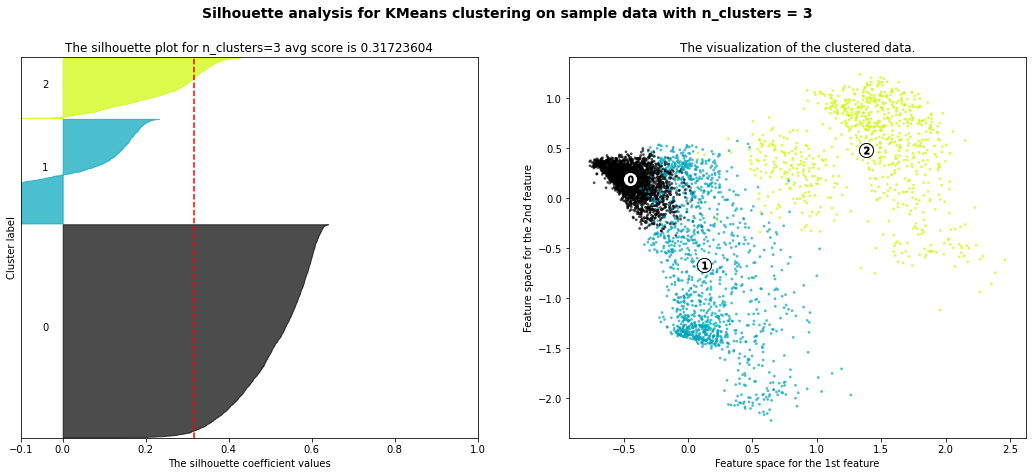
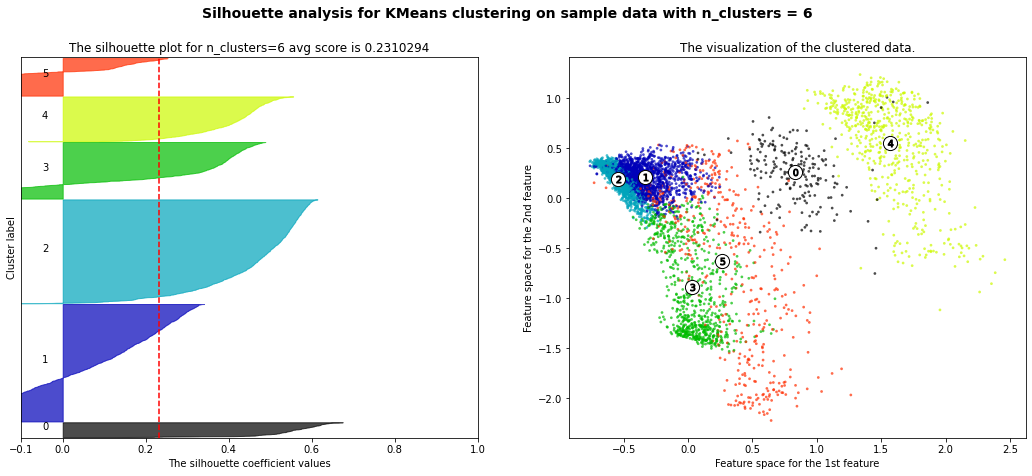
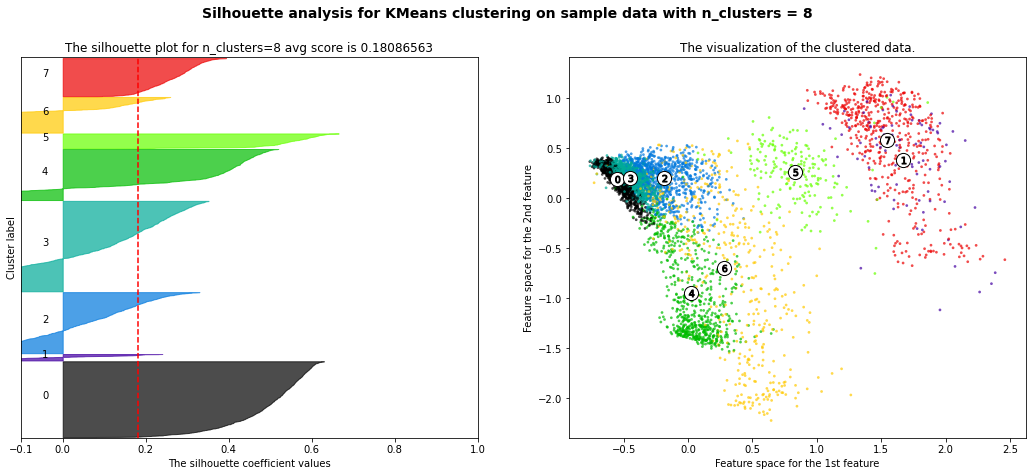
# analyze these parameters with the silhouette method
cluster_method.analyze_silhouette()
Best parameters from silhouette analysis are {'n_components': 2}
[6]:
{'n_components': 2}





[7]:
# pick the number of clusters
n = 3
cluster_method.choose_n(n)
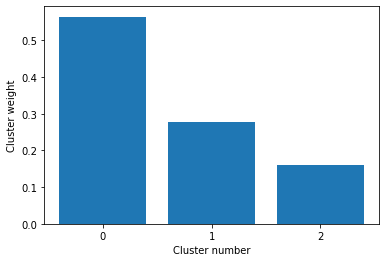
Step 3 - optionally pick a subset of clusters with the heighest weight
[8]:
cluster_method.plot_cluster_weight()
[9]:
cluster_method.choose_clusters(thr=0.007)
Chosen cluster ids: [0, 1, 2]

Step 4 - extract conformations for the ensemble
[10]:
# mode can be
# 1 - "center" and the representatives will be the points closest to the center of the clusters
# 2 - "hub" and the representatives will be the points with the most neighbors

mode = "center"
cluster_method.choose_conformations(mode=mode)
Choosing points closest to the cluster center
0
1
2

[11]:
cluster_method.chosen_frames
[11]:
array([ 983, 3838, 4030])
[12]:
ensemble_location = "./res_ensemble"
cluster_method.extract_conformations(ensemble_location)
Closest conformation inside cluster 0 frame 983 of the striped trajectory
Extracting and saving to ./res_ensemble/conf_in_cluster_0.pdb
Closest conformation inside cluster 1 frame 3838 of the striped trajectory
Extracting and saving to ./res_ensemble/conf_in_cluster_1.pdb
Closest conformation inside cluster 2 frame 4030 of the striped trajectory
Extracting and saving to ./res_ensemble/conf_in_cluster_2.pdb
Step 5 - save results for analysis
[13]:
with open("wf3_resulting_EnGen.pickle", "wb") as file:
    pk.dump(engen, file, -1)

with open("wf3_resulting_Clust.pickle", "wb") as file:
    pk.dump(cluster_method, file, -1)